Personal Genome Pipeline



Personal Genome Pipeline turns the files a consumer sequencing vendor gives you (FASTQ, BAM, VCF or Illumina ORA) into a full genomic profile on your own computer: small and structural variants, ClinVar and cancer-predisposition screening, pharmacogenomics, repeat expansions, HLA type, telomere content, mitochondrial haplogroup and heteroplasmy, runs of homozygosity, ancestry and polygenic risk scores. A vendor's own report covers a fraction of this and keeps your genome on their servers; a clinical lab charges per panel. Here every step is one Docker container with CPU and memory limits, run by a Nextflow pipeline (scripts/run-all.sh starts it for one sample) or from one bash script per step, and no script sends your data anywhere. Start with Getting started, then run the quick test on public data before your own.
-
Prerequisites, the four entry paths (FASTQ, BAM, VCF, ORA), the first run and what "it worked" looks like.
-
Run the pipeline on a small public sample first, so a setup problem shows up in minutes, not after twelve hours.
-
Every step with its tool, its image and whether it is required, which steps a default run includes, plus the pipeline graph.
-
What each report means, what is normal, what needs a genetic counsellor, and what to re-run when databases update.
What it finds
- Small variants: SNPs and indels with DeepVariant; structural and copy-number variants with Manta, Delly and CNVpytor merged into one consensus set.
- Clinical screening: known pathogenic variants from ClinVar, cancer predisposition panels with CPSR, VEP annotation with CADD, SpliceAI, REVEL and AlphaMissense, and slivar prioritisation of rare deleterious variants.
- Pharmacogenomics: PharmCAT and pypgx star alleles across 23 genes, CYP2D6 structural alleles with Cyrius, CPIC dosing recommendations.
- Ancestry and lineage: mitochondrial haplogroup and heteroplasmy, runs of homozygosity, ancestry SNP intersection, polygenic risk scores for ten conditions.
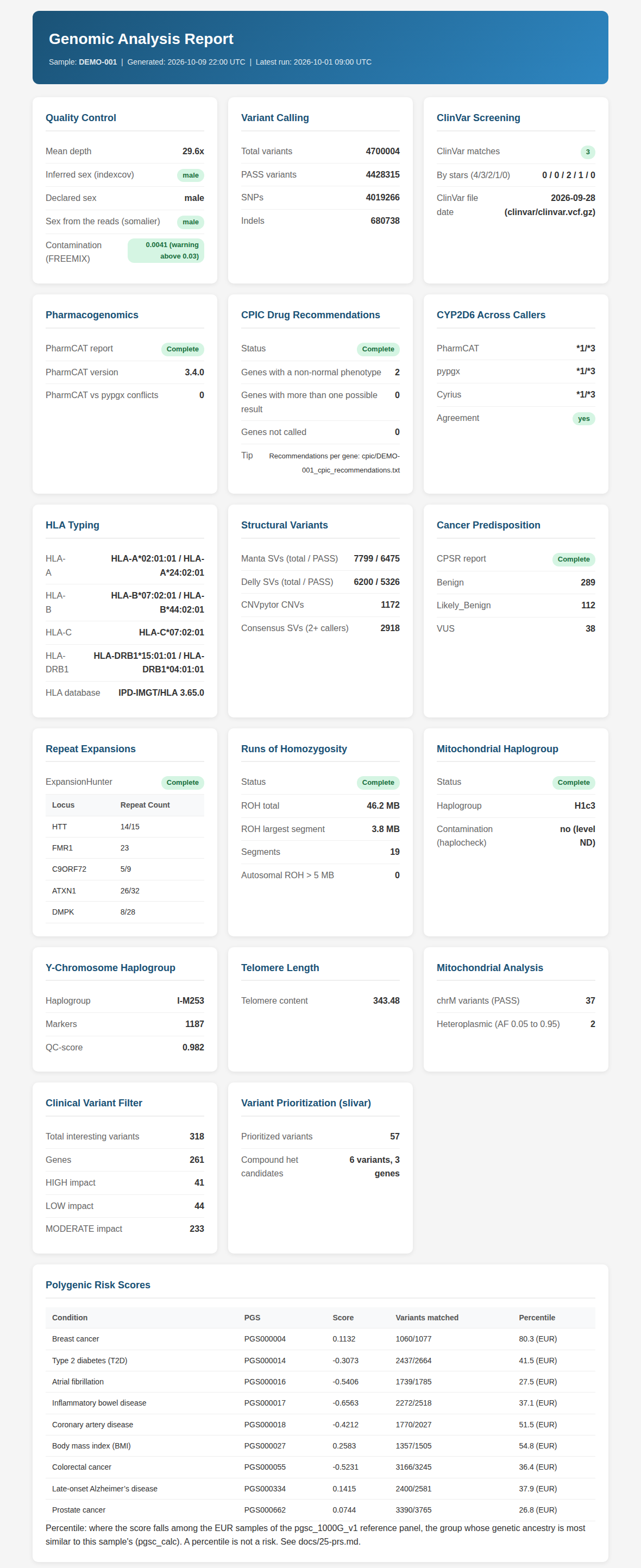
- Everything else the reads hold: HLA type, repeat expansions at the 31 loci of ExpansionHunter's catalog (Huntington's, Fragile X, ALS among them), telomere content, sex-chromosome check, coverage statistics, one HTML report and a MultiQC summary.
Pipeline steps
One page per step, grouped by stage. The step number is the script name and the output directory.
- Reads and small variants: 1 ORA to FASTQ, 1b fastp QC and trimming, 2 alignment, 3 DeepVariant, 3d Octopus (alternative).
- Structural and copy number variants: 4 Manta, 4b GRIDSS (alternative), 5 AnnotSV, 15 duphold, 18 CNVpytor, 19 Delly, 22 consensus merge.
- Clinical screening and annotation: 6 ClinVar screen, 13 VEP, 17 CPSR, 23 clinical filter, 29 somatic Mutect2 (opt-in), 30 vcfanno, 31 slivar.
- Pharmacogenomics: 7 PharmCAT, 21 Cyrius, 27 CPIC lookup, 32 pypgx.
- HLA, repeats and telomeres: 8 HLA typing, 9 ExpansionHunter, 9b Stranger, 10 TelomereHunter.
- Ancestry, risk and mitochondria: 11 ROH, 12 mitochondrial haplogroup, 14 imputation prep, 20 mitochondrial variants, 25 polygenic risk scores, 26 ancestry SNPs.
- Quality control and reports: 16 indexcov, 16b mosdepth, 24 HTML report, 28 MultiQC.
Alternative callers for benchmarking (BWA-MEM2, GATK HaplotypeCaller, FreeBayes, Strelka2, TIDDIT) are scripts without a page of their own; Variant caller benchmarking covers how to run and compare them.
How it runs
graph LR
    FASTQ["FASTQ / ORA"] --> fastp["fastp"]
    fastp --> align["minimap2"]
    align --> BAM["Sorted BAM"]
    BAM --> DV["DeepVariant"]
    DV --> VCF["VCF"]
    VCF --> vcfsteps["ClinVar, PharmCAT, VEP, CPSR,<br/>ROH, PRS, ancestry, haplogroup"]
    BAM --> bamsteps["Manta, Delly, CNVpytor, ExpansionHunter,<br/>HLA, telomeres, pypgx, Cyrius, mosdepth"]
    vcfsteps --> report["HTML report + MultiQC"]
bamsteps --> report- Each step is one
docker runwith an image tag or digest fromversions.env(listed on Image versions), a CPU limit and a memory limit, so a step cannot take the machine down. - Two ways to run it:
./scripts/run-all.sh <sample> <male|female>starts the Nextflow pipeline, which runs independent steps in parallel and resumes after a failure (Full run); or one bash script per step underscripts/, with Docker alone. - The minimum useful run is alignment, DeepVariant, ClinVar and PharmCAT, about 4 to 7 hours on a 16-core desktop; a default run is 6 to 12 hours. Hardware and storage requirements gives the per-step time, memory and disk figures; a 30X sample needs about 500 GB.
- After reference data setup a run downloads only a few public files, listed in Why run locally?. A BAM or VCF from your vendor skips alignment or variant calling; Getting started has the entry paths and Vendor compatibility the per-vendor notes.
What it does not do
- It is not a medical device and has not been clinically validated. Findings go to a genetic counsellor or physician before any decision; the pipeline uses the same tools a clinical lab uses, but without a lab's validation and confirmation.
- It does not give ancestry percentages or population percentiles for polygenic risk scores: both need a reference cohort the pipeline does not ship. Step 25 and step 26 say what the raw numbers can and cannot support.
- It does not call CYP2D6 reliably from a VCF alone; that gene needs the BAM-based callers (Cyrius, pypgx), and short-read WGS still misses some alleles.
- It does not impute. Step 14 prepares files for an external imputation server; sending them there is your decision.
Privacy
- Your reads, alignments and variants stay in
GENOME_DIRon your disk. No script uploads data. A run still pulls images and fetches a few public files; Why run locally? lists each one and what the HTML reports load when you open them. - The example outputs on these pages are invented or use placeholders. No page shows a real person's genotype, haplogroup, HLA type, score or sample name.
- Why run locally? compares the cost and the exposure of the alternatives.
Guides and reference
- Interpreting your results: what each report means and what to do with it.
- Multi-sample comparison: partners, siblings, parents; carrier overlap and shared variants.
- Long-read sequencing: Nanopore and PacBio HiFi entry paths and which steps change.
- Whole exome sequencing: what an exome can and cannot feed into the pipeline.
- Genotyping array data: 23andMe, MyHeritage and AncestryDNA files, converted correctly.
- Variant caller benchmarking: concordance and truth-set runs for the alternative callers.
- Common issues and FAQ, then the Troubleshooting guide: symptom, cause, fix, per step.
- Lessons learned: what failed during development and why the defaults are what they are.
- Tool selection rationale, the Glossary and Recommended resources for learning genomics.
Getting help
- Something broken: the Troubleshooting guide first, then an issue with the step number, the full error text, your platform and your input type.
- A security problem: follow the security policy, never a public issue.
- What is planned: the roadmap on GitHub. Sending a fix or a new step: CONTRIBUTING.md.
License
Personal Genome Pipeline is released under the GPL-3.0-or-later license. It is for educational and research use; it is not a medical device.