web-mirror





web-mirror saves the pages of one website as HTML files on your disk, and ships an nginx config to serve the copy offline. Each page is opened in headless Chromium through Playwright before it is saved, so a page that JavaScript builds is kept as a visitor sees it, where wget --mirror saves the page as the server sends it, before any script runs. A <video> on the page is downloaded next to it, and links to the site become local paths. It saves the HTML only: no stylesheets, scripts or images. The site and the page list are set in src/main2.py, not by a flag. Start with Getting started, then Configuration for the four lines to edit.
-
Edit four lines, build the image, run it, and see the files it writes. On an Apple Silicon Mac, build for amd64 and run it under Rosetta.
-
The lines in
src/main2.pythat name the site and the pages, the sitemap switch, and the other constants. -
Where each page lands on disk, nginx with the shipped config, and running it again.
-
What happens to each page, which links are rewritten, and what is not saved.
A run
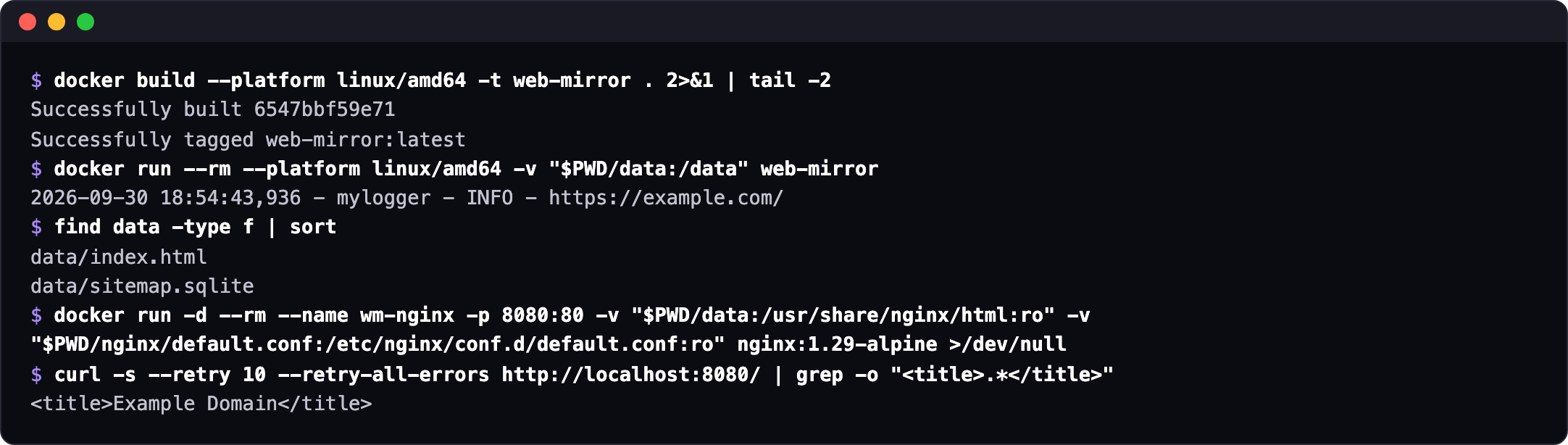
The run above is the Getting started path against https://example.com/: one page in the list, one line of log per page, the copy in ./data, then nginx serving it on port 8080.
What it saves
- Each page in the list, as the browser holds it after the page loads and 3 more seconds pass, in a folder named after its URL path.
- The file of a
<video src>on a page, next to that page's HTML. - The site's own links, rewritten to paths from the root, so the copy links to itself.
- Optionally every page of the site's
sitemap.xmlinstead of a fixed list (Configuration).
How it runs
- One Docker image,
drumsergio/web-mirror, for linux/amd64 only; an Apple Silicon Mac runs it under Rosetta, not QEMU (Troubleshooting). It runssrc/main2.pyonce and exits; the copy is written to/data, which you mount from your disk. - The image carries the placeholder site
www.place.holder, so you either build your own after editing the file or mount your edited file into it (Usage). - The container talks to the site you set; while a page renders, Chromium also loads whatever that page loads (its scripts, images and trackers). nginx then serves the files from your disk and fetches nothing.
What it does not do
- It does not download stylesheets, scripts, images or fonts. Offline, a saved page shows its text without its styles or pictures.
- It does not crawl. Only the pages in the list, or in the sitemap, are saved.
- A saved video page does not play its video from the copy: the page's
srcis written as//data/..., which a browser reads as a host nameddata. The video file itself is saved. See Troubleshooting. - It has no command-line flags or environment variables.
Getting help
- A build or a run fails: Troubleshooting lists what has gone wrong and what to include in an issue.
- Something else: open an issue. A security problem goes through the security policy, never a public issue.
- Running the tests and releasing: Development. The other web-archiving tools: Related projects.
License
web-mirror is released under the GPL-3.0-or-later license. It is built on Playwright and Beautiful Soup.