Step 28: MultiQC Aggregated QC Report
Scans the sample directory for QC outputs from all pipeline steps and combines them into a single interactive HTML dashboard.
What It Does
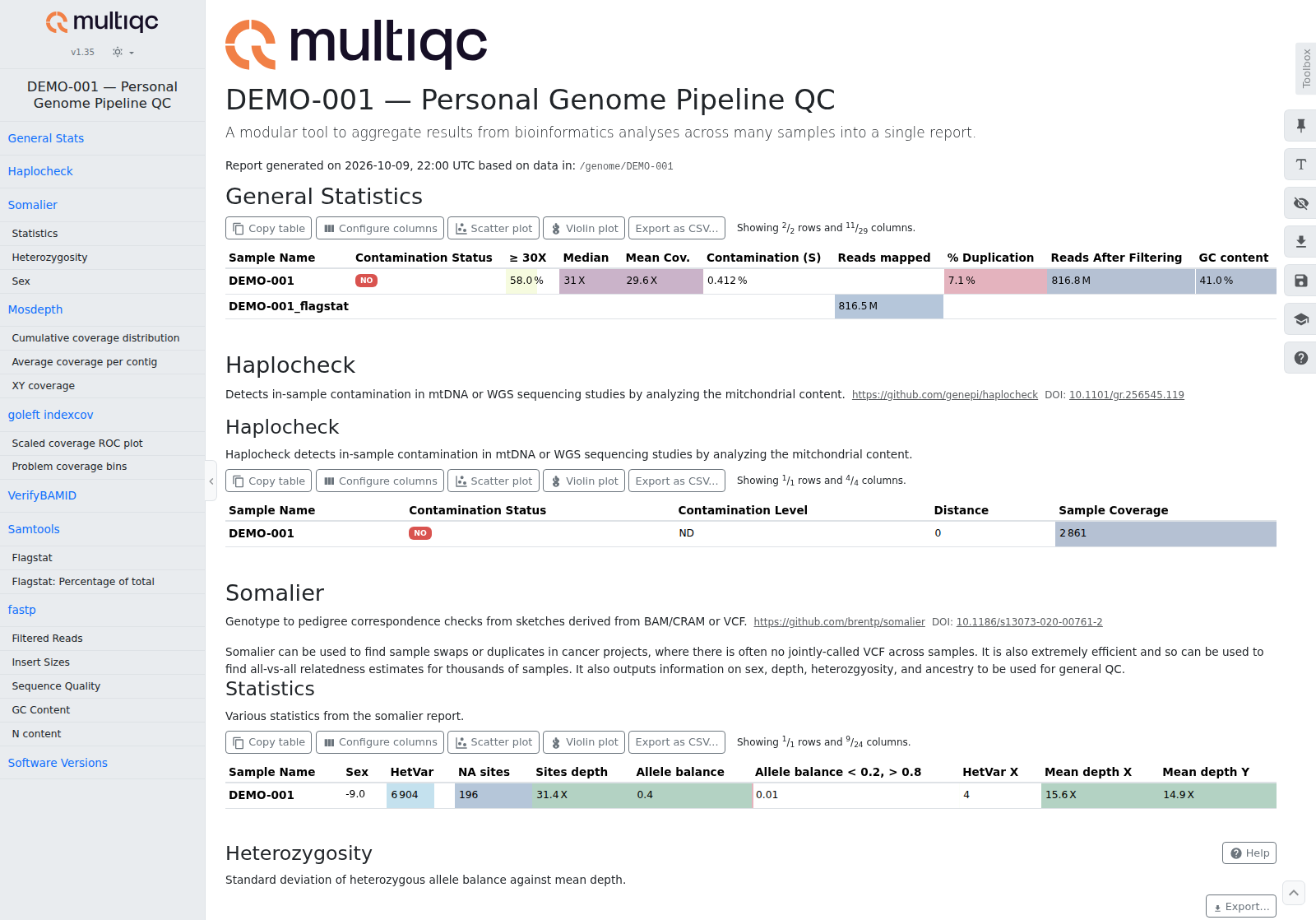
MultiQC auto-discovers output files from supported bioinformatics tools and renders them into a unified report with: - Summary statistics table — key metrics from each tool in one view - Interactive plots — quality distributions, coverage curves, adapter content - Before/after comparisons — fastp filtering impact
Why
Without MultiQC, you need to open separate reports from each tool (fastp HTML, mosdepth summary, samtools flagstat). MultiQC combines everything into one page, making it easy to spot problems at a glance.
Tool
MultiQC v1.35 — aggregate bioinformatics QC reports.
- Paper: Ewels et al., Bioinformatics 2016 (doi:10.1093/bioinformatics/btw354)
- Source: github.com/MultiQC/MultiQC
Docker Image
MULTIQC_IMAGE
Pinned in versions.env; Image versions lists the current tag.
Command
Discovered Tools
MultiQC scans the entire sample directory and auto-detects outputs from these pipeline tools:
| Tool | File Pattern | Pipeline Step |
|---|---|---|
| fastp | *_fastp.json |
Step 1b (QC + trimming) |
| samtools flagstat | *_flagstat.txt |
Generated automatically |
| mosdepth | *.mosdepth.summary.txt, *.mosdepth.global.dist.txt |
Step 16b |
| somalier | qc/somalier/*.samples.tsv, *.pairs.tsv |
Step 33 |
In the somalier table, Sex is the sex you declared to step 33 (somalier's original_pedigree_sex, unknown when you declared none) and Inferred sex is somalier's sex column: the declared sex's code, changed when the reads say otherwise. Step 33's own table (qc/<sample>_sample_qc.tsv) holds the verdict.
The script generates samtools flagstat output automatically if a BAM exists but no flagstat file is present.
In the Nextflow pipeline, multiqc reads the mosdepth summaries only. A run with no BAM, or without mosdepth in --tools, has none, so MultiQC is skipped and the log says so in one line (multiqc skipped: ...).
Output
| File | Location | Description |
|---|---|---|
| HTML report | multiqc/multiqc_report.html |
Interactive QC dashboard (open in browser) |
Runtime
< 1 minute. MultiQC only parses summary files, not raw data.
Notes
- MultiQC runs after all other steps to capture the most outputs. Through
run-all.shit is the pipeline'sMULTIQCtask: it reads the mosdepth summaries (above) and writes${GENOME_DIR}/multiqc/multiqc_report.html, beside the sample folders rather than inside one. Run./scripts/28-multiqc.sh <sample_name>for the script's report of every QC file in the sample folder - The report title includes the sample name for easy identification
- If you add new tools to the pipeline that MultiQC supports, their outputs are picked up automatically on the next run
- To re-generate the report (e.g., after running additional steps), delete the
multiqc/directory and re-run