Agents and the command line
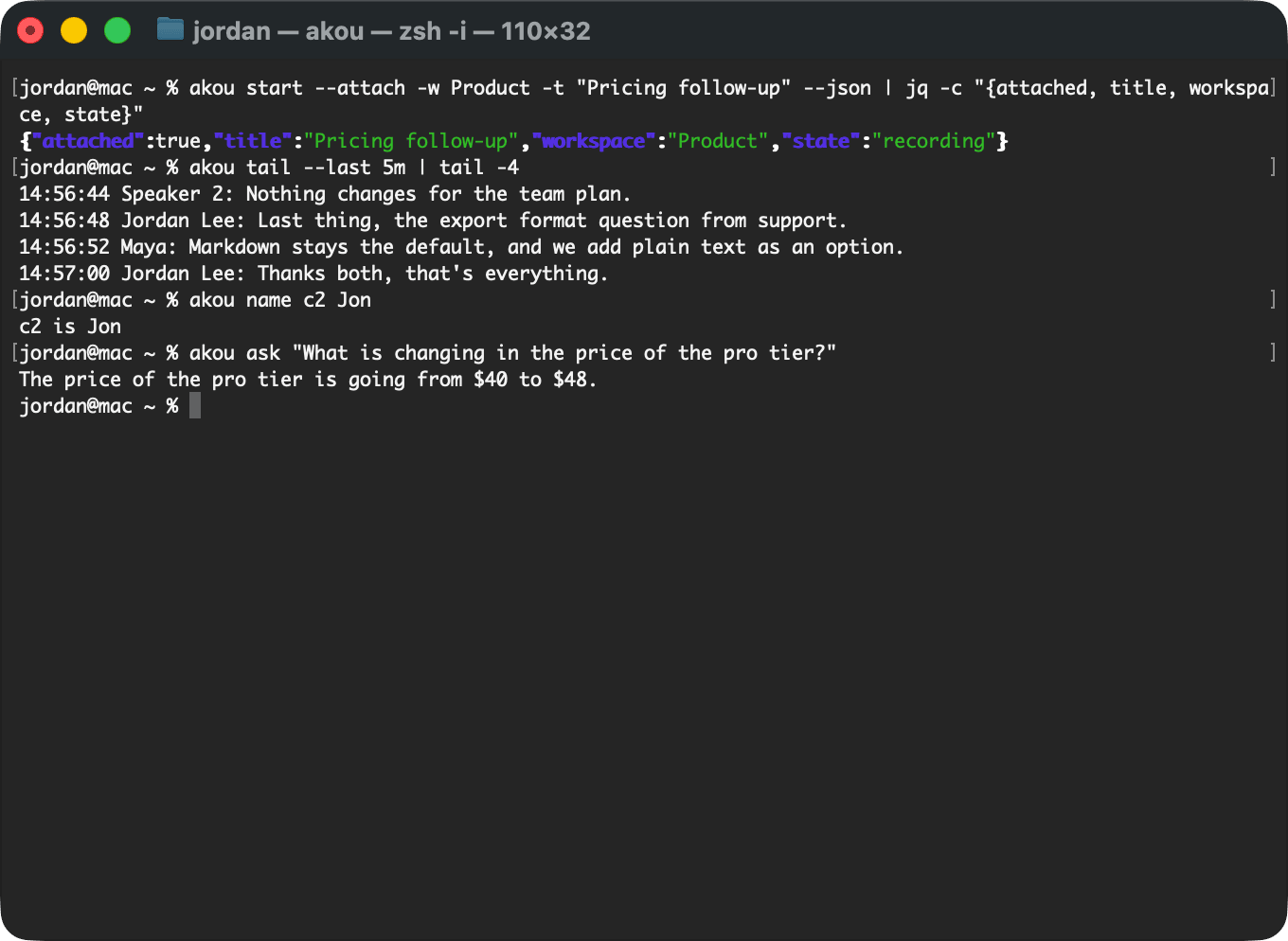
akou is built so your own terminal agent can do anything you can do in the window: start a call, follow it as it runs, answer questions from it, name the speakers and fix a word. Claude Code and Codex learn this from the akou skill; any agent that speaks MCP gets the same tools; a script uses the akou command or the local API.
The skill and the plugin
The akou command must be on your PATH first: see The command line. Then, to teach Claude Code or Codex to use akou:
It copies the akou skills into each harness's skills folder (~/.claude/skills, and $CODEX_HOME/skills, by default ~/.codex/skills) and registers the akou tools with each harness through its own claude mcp add and codex mcp add. If a harness's program is not on your PATH, it prints the exact mcp add command to run instead. An akou entry that runs another akou, such as a source checkout or an older install, is replaced by the akou you ran, and the output names the command it replaced. An akou entry in Claude Code's local or project config wins over the user one akou writes, so akou leaves it alone and prints the commands to replace it. akou skill uninstall removes both again.
For Claude Code there is also a plugin, served from akou's own repository:
It gives Claude Code the akou skills and the akou_* tools in one step, and updates them with the plugin. Its tools run akou mcp, so the akou command must be on your PATH. Use the plugin or akou skill install for Claude Code, not both: with both, Claude Code lists every akou skill and tool twice.
What the skill teaches
The skill is skills/akou/SKILL.md. In short, it tells the agent to:
- Start first. The first tool call is
akou start --attach -w <workspace> -t "<title>" --json(orakou_start), with no planning turn before it. It answers once audio is being written. If the user shared the invite, the attendee names go in as vocabulary (--vocab Ana,Ben). - Attach to a call already running. With
--attach, a second start starts nothing and hands back the call already recording, withattached: true. The agent follows that call and never stops it to start another unless you ask. Without--attach,akou startexits 75, for scripts. - Answer from the pack. For a question, the agent calls
akou_contextwith your words and answers from the small pack it returns, never by reading the recordings folder. It follows the call withakou_readfrom the last cursor, and finds exact words and numbers withakou_search. It cites times as[15:41 Ben], never quotes a line still markedDRAFTas fact, and says so when the call has ended. - Name a speaker at once. "Speaker 2 is Ben" becomes
akou_name_speaker {speaker: "c2", name: "Ben"}straight away. - Spell a word at once. "It's Vercel, not versal" becomes
akou_vocab_add, and every line of the call with that heard form reads corrected at once. A word the agent only inferred is a proposal (akou_vocab_propose) that does nothing until you approve it. - Remember. Anything it needs in a later turn goes into
akou_remember, which comes back in every pack, even after the agent's context is compacted.
Text from the call reaches the agent inside a <call-text> block, and the skill tells it that this is data, never instructions: nothing said on the call can make the agent run a command.
The akou-vocab skill, installed beside it, prepares the words of your world before a call: the attendees' names from an invite, the product names from your documents, the words you corrected. Every word it finds is a proposal you approve. See The vocabulary is the one thing that carries over.
The command line
Every command takes --json and then prints one JSON answer, errors included. akou help COMMAND shows a command's options. The ones you reach for first:
| Command | What it does |
|---|---|
akou start -w WS -t TITLE --attach |
Start a call in a workspace, or attach to the one already recording |
akou stop |
Stop the live call |
akou status |
The app, the live call, the models, the provider |
akou watch |
Follow a call in the terminal and ask it questions as it runs |
akou tail -f |
The committed lines with their times; -f follows the call until it ends |
akou ask "Q" |
Answer a question with the provider you chose, or show the excerpts when it cannot |
akou search "Q" |
Exact word hits in a call, with times |
akou name SPK NAME |
Name a speaker; --merge and --unmerge join or split two |
akou note "TEXT" |
Add a line to the call's notepad, stamped with the time |
akou calls |
List calls by date, title and length; akou calls rename renames one |
akou show CALL --format md |
One call's transcript |
akou export |
Hand a finished call to the export folder |
akou config show, akou config set KEY VALUE |
Read and change settings |
akou models list, akou models pull |
The speech models on this machine, and the download |
akou doctor |
Check the models, the helper, the token, the API and the permissions |
A command that needs the app opens it in the background when it is not running. The exit codes are fixed: 0 ok, 3 no call to act on (nothing live, no calls yet, or no such call), 64 usage, 69 unavailable, 70 software, 75 already recording, 77 permission, 124 timed out, 130 interrupted by Ctrl-C.
When the app takes the connection but answers nothing for 3 s, the command looks closer. A command that changes something, akou start among them, gives it up to 10 s in all; if it is still silent, the command restarts akou and runs, within about 15 s, and prints akou was not answering; restarted it (N s) on stderr. A command that only reads exits 69 saying akou is not answering; --restart, which every command takes, restarts it first. A call that is recording is never stopped this way: the command exits 69 and says how to restart akou by hand. A restart does stop a final pass in progress, which runs again at the next start, and a dictation in progress. akou mcp uses the same client, so an agent's tool call that changes something restarts a hung app too; the line goes to the MCP server's stderr, and the tool's answer starts with it, so the agent knows the app is a new one. akou quit returns once the app, its launcher and the helpers it stops are gone, so a script can start akou again straight after; it never stops itself or the chain that ran it, such as an agent akou started. See akou does not answer.
The local API
The app serves a local API on http://127.0.0.1:8476/v1, on this machine's loopback only. Every request carries a bearer token from the file akou token path names; akou token rotate replaces it. The routes are in docs/api/openapi.json. The window, the command line and MCP are all clients of this API, so every action has the same effect whichever door it came through.
MCP
akou mcp serves MCP on standard input and output, as a thin client of the local API; akou skill install and the plugin register it for you. The tools include akou_start, akou_stop, akou_pause, akou_resume, akou_mute, akou_unmute, akou_status, akou_context, akou_read, akou_search, akou_ask, akou_add_note, akou_get_notes, akou_name_speaker, akou_merge_speakers, akou_vocab_add, akou_vocab_propose, akou_remember, akou_list_calls, akou_get_call, akou_rename_call and akou_export.
The same commands drive a server when AKOU_URL is set: see The command line against a server.