media-download




media-download is two Python scripts that mirror a publication catalog into a folder: media-vtt.py saves the VTT subtitles of every media item, and publications-epub.py saves the EPUB of every publication. Each keeps a SQLite file of what it already fetched, so you can run it again whenever you like and it only downloads what is new. The catalog endpoints in the source are placeholders (https://place.holder/...): nothing runs until you point them at a catalog that answers in the shape the scripts expect. Start with Getting started, then Usage.
-
Set the endpoints, add
unit.dbfor the EPUBs, and run both scripts with Docker Compose or plain Python. -
Run one script or both, run them again, and read what the log and the output folder tell you.
-
The four environment variables, the endpoints in the source and the compose file's folders.
-
What each script asks the catalog for, the answers it expects, and which items it tries again.
What a run looks like
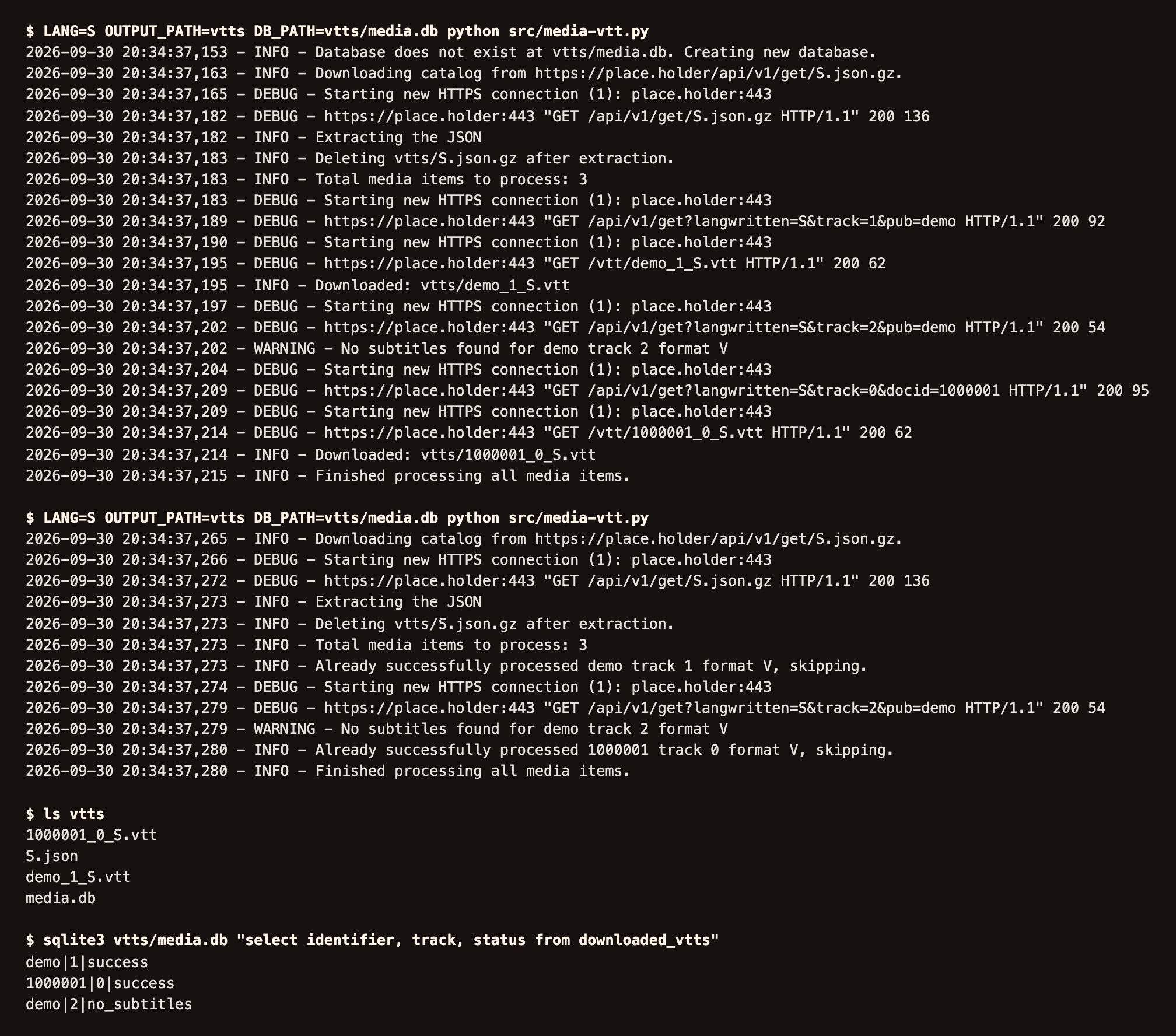
media-vtt.py, run twice against a stand-in for the catalog with three invented media items. The first run saves two VTT files and records that the third item has no subtitles. The second run skips the two it already has, asks again about the third, and downloads nothing new. Usage explains each line.
What it does
- Saves the subtitles of every media item in the catalog as VTT files, each under the file name in its URL.
- Saves the EPUB of every publication in one language, including each issue of a periodical, under the name the server sends or
<symbol>_<issue>.epub. - Records each item's result in SQLite (
media.db,pubs.db), skips what it already has, and tries each download up to three times, waiting longer after each failure. LANGpicks the catalog language. One container per script, both in the shippeddocker-compose.yml.
How it runs
- Each script runs once, from start to end, and exits. Nothing in the repository schedules it; run it again, by hand or from your own scheduler, to pick up what is new.
- Docker Compose builds both images from the repository (
Dockerfile-media,Dockerfile-epubs, Python 3.11). No image is published to a registry. - Without Docker,
python src/media-vtt.pyworks with Python 3.11 or 3.12 and the packages inrequirements.txt. See Getting started.
What it does not do
- It does not download from an arbitrary web page. It reads one catalog in one fixed shape. To save a live page, see web-mirror on Related projects.
- It does not ship working endpoints. You set them in the source.
- It does not download the videos or audio themselves, only their subtitles.
media-vtt.pydoes not retry an item it markedfailed; Troubleshooting says how to clear it.
Privacy
- Both scripts talk only to the endpoints you set. There is no telemetry and no account.
- Everything they fetch stays in the output folders you mount.
Getting help
- Something broken: read Troubleshooting, then open an issue with the details it lists.
- A security problem: follow the security policy, never a public issue.
- Running the tests or changing the code: Development.
License
media-download is released under the GPL-3.0-or-later license.