Usage
Both scripts take no arguments. They read their settings from environment variables (Configuration), fetch the catalog, work through it item by item, and exit.
Run both, or one
docker compose up --build                          # both scripts
docker compose up --build media-download-media     # subtitles only
docker compose up --build media-download-epubs     # EPUBs only (needs ./db/unit.db)
Without Docker, set the variables on the command line:
LANG=S OUTPUT_PATH=vtts DB_PATH=vtts/media.db python src/media-vtt.py
LANG=S OUTPUT_PATH=epubs DB_PATH=epubs/pubs.db UNIT_DB_PATH=db/unit.db python src/publications-epub.py
Run it again
Each run downloads the whole catalog index again, then skips every item its SQLite file already marks as done. So a second run is quick and only fetches what the catalog added since. Nothing in the repository schedules a run; use your own scheduler (cron, a systemd timer, a scheduled container) if you want one.
What a second run does with each item, by the status the first run left:
| Status | Script | Next run |
|---|---|---|
success |
media-vtt.py |
skipped |
failed |
media-vtt.py |
skipped, never tried again (see Troubleshooting) |
no_subtitles |
media-vtt.py |
asked again on every run |
processed |
publications-epub.py |
skipped |
no_epub, failed |
publications-epub.py |
tried again |
Reading the log
The log is at DEBUG level, so the HTTP requests show up as well. This is media-vtt.py run twice against a stand-in catalog of three invented media items:
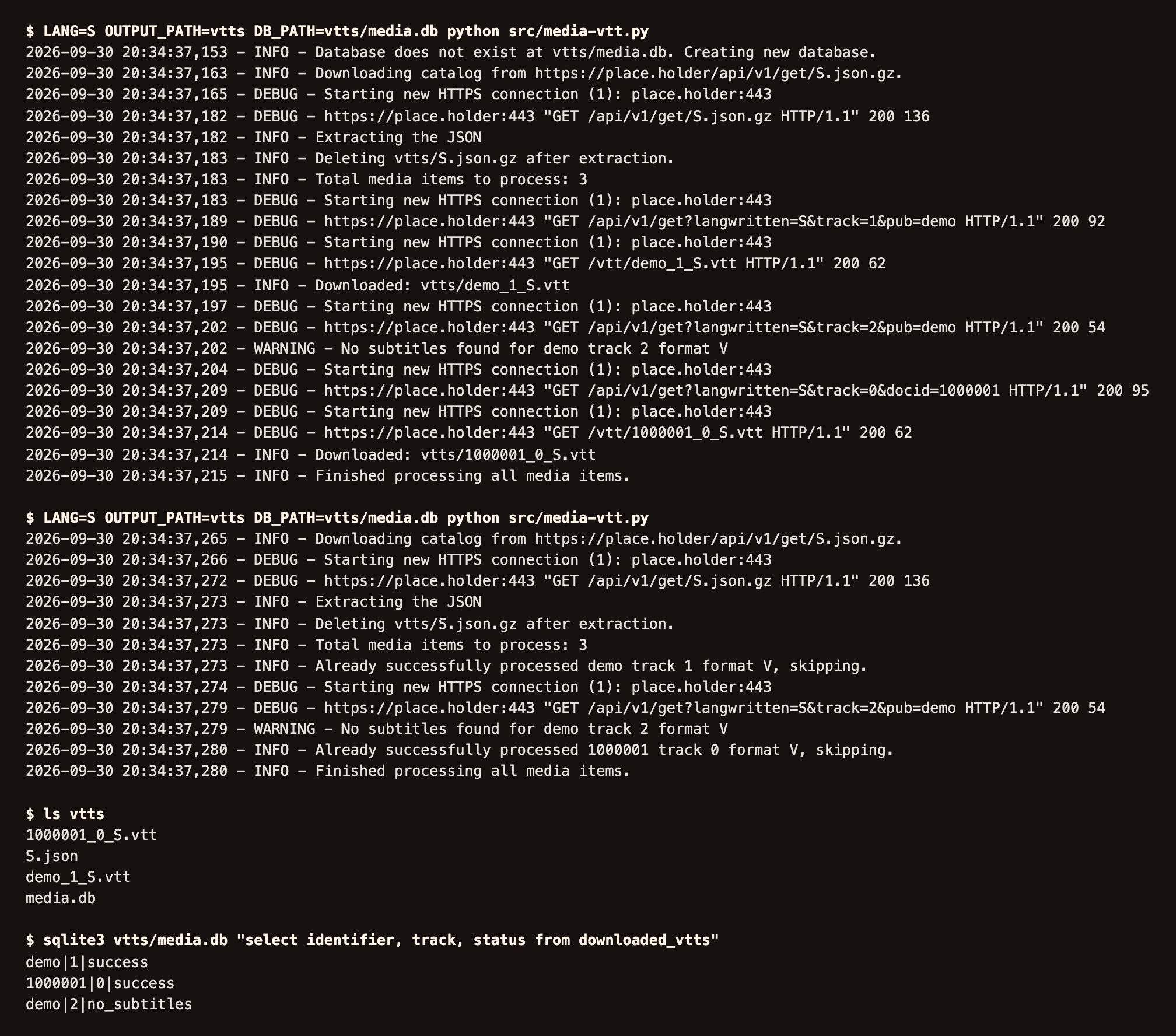
Total media items to process: 3: the number ofmedia-itementries in the catalog index.Downloaded: vtts/demo_1_S.vtt: a subtitle file saved under the name in its URL.No subtitles found for demo track 2 format V: the catalog lists the item but has no subtitles for it in this language. It is recorded asno_subtitlesand asked about again next run.Already successfully processed ..., skipping.: the second run found the item inmedia.db.
The EPUB script logs Processing publication 3/120: Symbol=..., TagNumber=..., sym=... for each publication, then Downloaded file to ..., No EPUB files found for ..., or Skipping already processed entry ....
What the output folder holds
- The downloaded files:
*.vttin the subtitles folder,*.epubin the EPUB folder. - The state file:
media.dborpubs.db, unlessDB_PATHpoints elsewhere. - The last catalog index the script read:
<LANG>.json(subtitles) orlog(EPUBs). Each run overwrites it.
To see what was saved and what was not: