Getting started
From Plugin Repository (Recommended)
Add the following repository URL in Dashboard > Plugins > Repositories:
Then install SmartCovers from the plugin catalog and restart Jellyfin.
From Releases
- Download
smart-covers_<version>.zipfrom the latest release. The version is the tag without thev, for example7.4.0.0. - Extract the contents into your Jellyfin plugins directory:
The zip contains
SmartCovers.dll(with the CBZ/CBR archive reader merged in),PDFtoImage.lib(the PDFtoImage managed library, shipped with a.libextension so Jellyfin's plugin scanner skips it), native PDFium libraries for all platforms underruntimes/<rid>/native/, andTHIRD-PARTY-NOTICES.md. - Restart Jellyfin.
Turn it on per library
Jellyfin does not switch a new image fetcher on by itself, and a library you created before the install keeps its old fetcher list. Open Dashboard > SmartCovers, click Enable on each library, then Refresh Images. The same switch is in each library's own settings under Image fetchers, as SmartCovers.
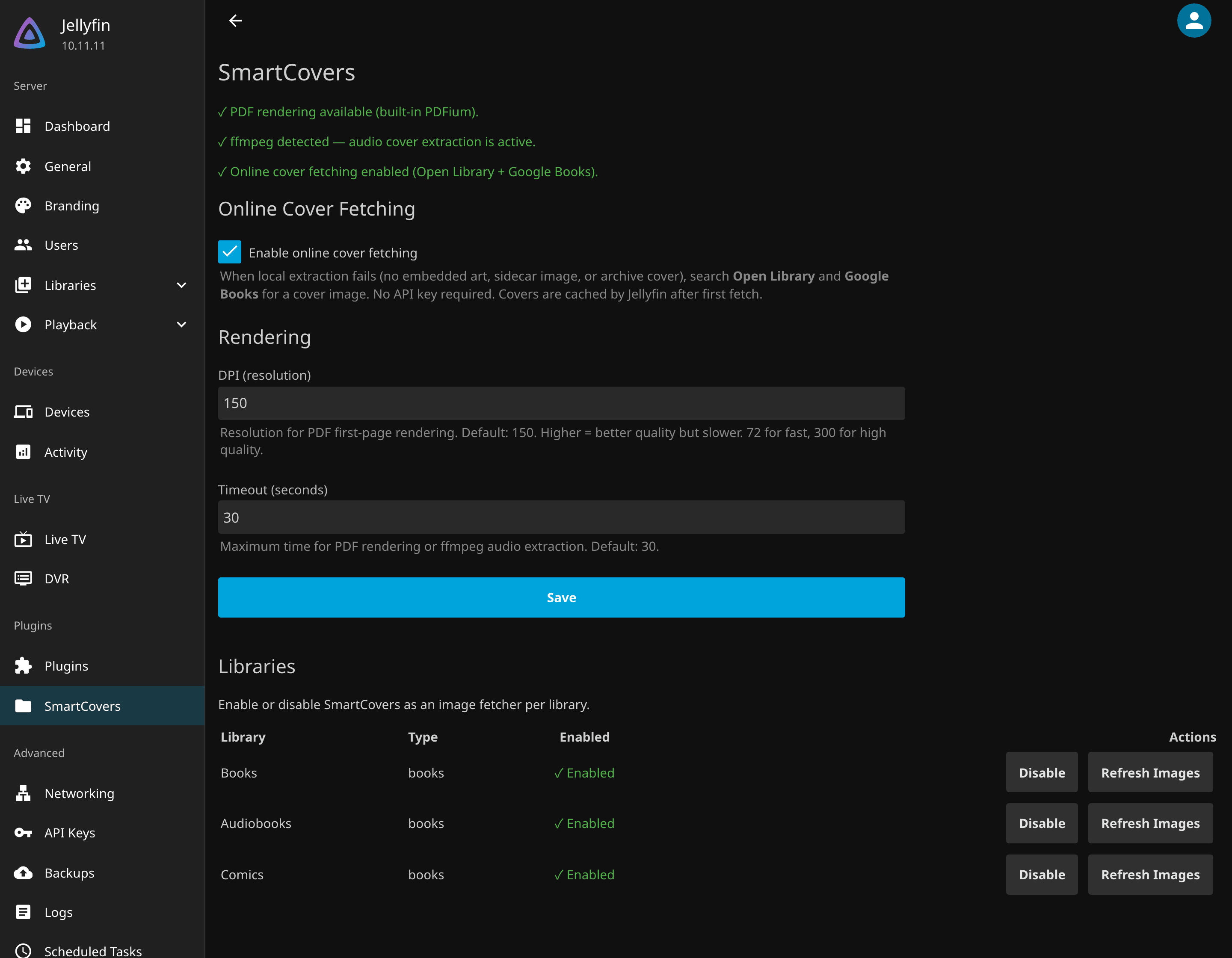
Check that it works
- The SmartCovers page shows three green lines: PDF rendering available, ffmpeg detected, online cover fetching enabled. An orange line names what is missing and every other format keeps working.
- Covers appear on the tiles while the refresh runs. Open the library and reload after a minute.
- Books and audiobooks still blank in enabled libraries are retried by Refresh items missing a cover (Dashboard > Scheduled Tasks, category SmartCovers) every night at 04:00; run it by hand from that page to retry now.
Requirements
| Dependency | Required For | Notes |
|---|---|---|
| Jellyfin 10.11+ | All features | Minimum supported server version |
ffmpeg |
Audio covers | Bundled with Jellyfin Docker images |
| Bookshelf plugin v13+ | EPUB covers | Recommended; handles standard EPUB covers as primary provider |
PDF rendering requires no external dependencies: the native PDFium library is bundled with the plugin for all platforms (Linux x64/arm64/musl, macOS x64/arm64, Windows x64/x86/arm64). CBZ/CBR extraction is pure managed code (SharpCompress, merged into SmartCovers.dll) and works everywhere with no external dependencies either.