Telegram Archive





Telegram Archive is a self-hosted backup of one or more Telegram accounts. It runs on your own machine, in Docker or from the Python package. A web viewer lets you read and search what it saved. Only the backup talks to Telegram. The viewer only reads the archive.
-
Log in to Telegram, then start the backup and the viewer with the shipped compose file.
-
Follow the first run, check that it worked and pick the settings to change next.
-
Read chats, search messages and browse shared media.
-
Every setting, its default and what it changes.
The viewer
The viewer looks and works like the Telegram app, with the archive behind it. See Using the viewer.
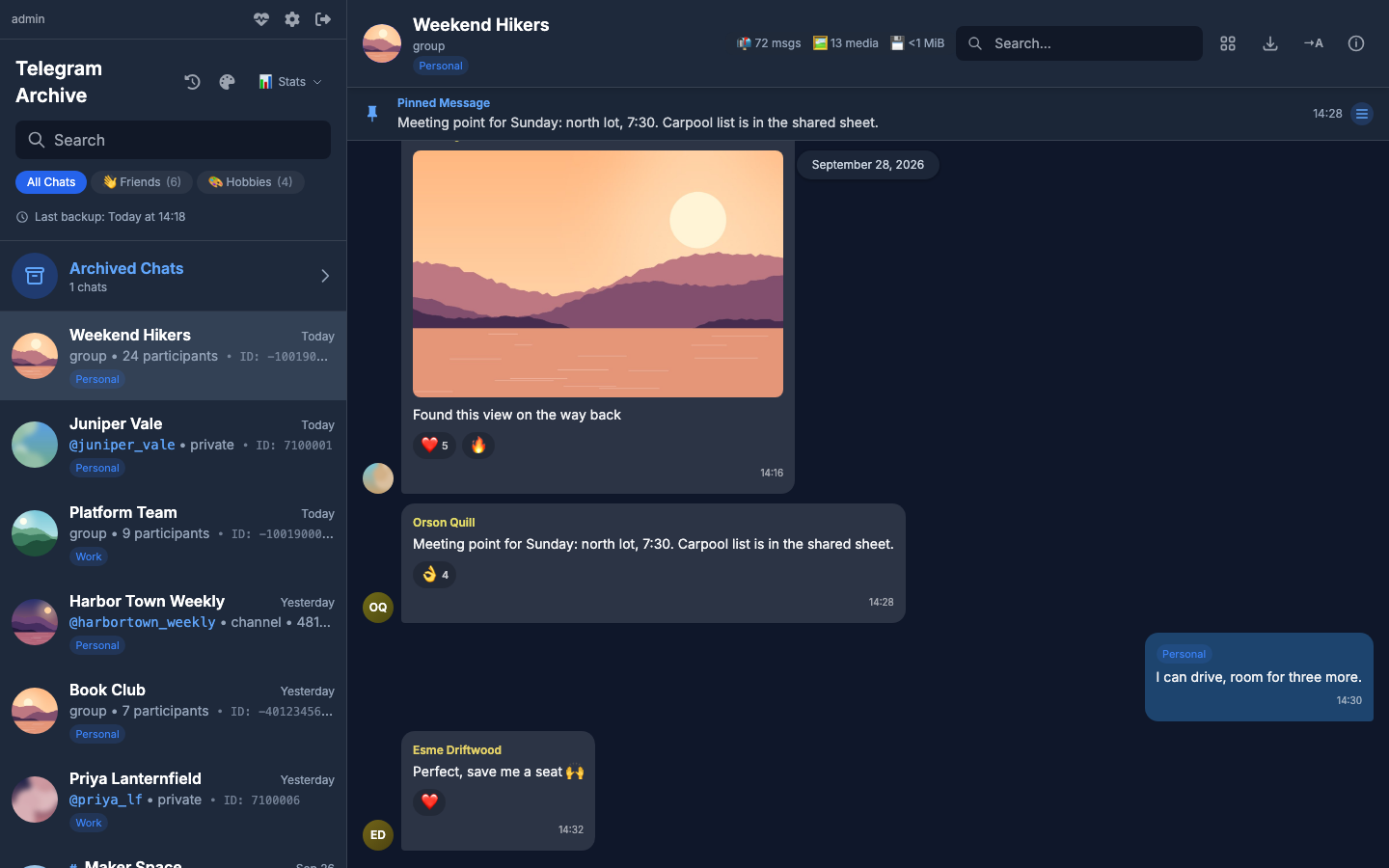
What it saves
- Messages with their formatting, replies and forwards.
- Edits and deletions. An edit keeps the earlier version, and a deleted message stays in the archive, marked as deleted. The real-time listener catches edits when
ENABLE_LISTENER=true, and deletions when you also setLISTEN_DELETIONS=true. The scheduled backup catches both withSYNC_DELETIONS_EDITS=true. See Catching changes to older messages. - Photos, videos, voice notes, audio files, round videos, GIFs, stickers, documents and link previews. Each file is stored once and shared between the chats that hold it. By default the backup skips files over 100 MB. See Media downloads.
- Reactions, as a count per emoji.
- Pinned messages, polls, service messages, forum topics, Telegram folders, archived chats, avatars and earlier profile photos.
- Several accounts in one archive. See Multiple accounts.
- Transcripts of voice messages once you configure a transcription server. Other audio and video can be transcribed too if you turn that on. See Voice transcription.
- Imports from Telegram Desktop exports. See Import and maintenance tasks.
The backup skips bot chats unless you add them. See Choosing chats.
How it runs
flowchart TB
    TG[Telegram]
    subgraph backup [Backup container]
        SCH[Scheduler]
        CL[One client per account]
        LI[Real-time listener, optional]
        MIG[Migrations on start]
    end
    DB[(Database<br/>SQLite by default<br/>PostgreSQL optional)]
    MEDIA[(Media folder)]
    TR[Transcription server, optional]
    subgraph viewer [Viewer container]
        WEB[Web viewer on port 8000<br/>reachable from this machine only]
    end
    BR[Browser]

    TG <--> CL
    SCH --> CL
    LI --> CL
    CL --> DB
    CL --> MEDIA
    MIG --> DB
    backup -.->|audio| TR
    DB --> WEB
    MEDIA --> WEB
WEB <--> BR- The backup image is
drumsergio/telegram-archiveand the viewer image isdrumsergio/telegram-archive-viewer. Both share one version number, run on linux/amd64 and linux/arm64, and run as user id 1000. - A backup runs when the container starts, then on a cron schedule. The default is 00:00, 06:00, 12:00 and 18:00 in the container's time zone, which is UTC in the image. See Schedule and backup tuning.
- When the listener is on, it captures changes between runs.
- At the end of each run, the backup retries failed media downloads, verifies media if
VERIFY_MEDIAis on, and processes pending transcriptions. WithFILL_GAPSon, the scheduler then looks for missing messages.
What it does not do
- It does not save secret chats.
- It cannot recover messages deleted before the first backup.
- The backup and the viewer never send or change anything in your Telegram account. Only the separate restore script sends messages: it posts archived messages back to a chat as you. See Command line and Python API.
- The viewer interface is in English only and has no offline mode.
Privacy
- The archive stays on your own disk. Nothing leaves it unless you turn on one of the optional features below.
- The backup and viewer logs never contain message text, chat ids, Telegram account labels or phone numbers. Commands you run by hand, such as
list-chatsandfill-gaps, print the ids and names of the chats they work on, andLOG_CHAT_TITLES=trueadds chat titles to progress lines. -
Transcription is optional. When you turn it on, it sends these to the transcription server you configure:
- The audio. For a video, or a file over the upload limit, that is the sound track extracted from it.
- A file name taken from the stored file.
- The stored file's content hash, a fingerprint of the file.
- Your API key, when you set one.
- Your transcription options.
- Your callback URL, when you set one.
No message text or chat details go with it. See Voice transcription. - The event webhook is optional. When you turn it on, it sends each edit or deletion to the URL you configure. The default body holds the event name, the account, chat, message and sender ids, the chat title, the sender name, the message date, the media type, the message text and, for an edit, the old and new text.
EVENT_WEBHOOK_BODY_TEMPLATEchanges the body. See Event webhook. - Web Push notifications are optional. WithPUSH_NOTIFICATIONS=full, the chat title, the sender name and the first 100 characters of each new message go through your browser's push service, encrypted for the browser. See Live updates and notifications.
Getting help
- If something is broken, read Monitoring and troubleshooting, then open an issue with the details it lists.
- To report a security problem, follow the security policy and do not open a public issue.
- The changelog on GitHub lists what changed between releases.
- The Glossary explains the terms these pages use.
- To script against the viewer, use the HTTP API.
- The Roadmap lists what is planned next.
- To send a fix or a feature, read Contributing.
License
Telegram Archive is released under the GPL-3.0 license. It is built on Telethon.