Choosing chats
These settings decide which chats the backup captures.
What is captured by default
Out of the box the backup captures private chats, groups and channels. Chats with bots are skipped.
Every chat falls into one of four types:
| Type | What it covers |
|---|---|
private |
One-to-one chats with a user who is not a bot |
bots |
Chats with a bot account |
groups |
Basic groups and supergroups |
channels |
Broadcast channels |
CHAT_TYPES takes a comma-separated list of these four tokens. Any other token stops startup with an error. Bots have no include or exclude lists of their own. They use the PRIVATE_ lists.
If you set CHAT_TYPES to an empty value, no type matches. Only chats named in an include list are then captured.
An empty CHAT_TYPES under Docker Compose
The stock docker-compose.yml passes CHAT_TYPES with a fallback to private,groups,channels. An empty value in .env therefore becomes the default, not "no types". See Run with Docker for how the compose file handles .env.
Two filter modes
The backup works in one of two modes. CHAT_IDS decides which one.
Whitelist mode
Whitelist mode applies when CHAT_IDS is not empty. The backup captures only those chats. It fetches each one directly. It lists your dialogs only in the fallback scan described below.
In this mode the backup ignores:
- CHAT_TYPES
- every include and exclude list
- every folder variable
These settings still apply:
- PRIORITY_CHAT_IDS
- SKIP_MEDIA_CHAT_IDS
- supergroups adopted through FOLLOW_CHAT_MIGRATIONS, minus any chat in GLOBAL_EXCLUDE_CHAT_IDS, GROUPS_EXCLUDE_CHAT_IDS or CHANNELS_EXCLUDE_CHAT_IDS
Whitelist mode ignores the exclude lists, so EXCLUDE_DELETE_EXISTING does nothing here. The other delete options still apply: SKIP_MEDIA_DELETE_EXISTING and YOUTUBE_VIDEOS_DELETE_EXISTING delete on whitelisted chats too.
Telegram sometimes cannot resolve an id the session has not seen yet. This is usually a private chat the account has not opened since logging in. The backup then scans up to WHITELIST_RESOLVE_DIALOG_LIMIT dialogs once to find it. The default is 1000, and 0 turns the scan off. The scan stops after 300 seconds whatever the limit.
The backup remembers ids that still fail after a full scan, so it does not repeat the scan on every run. Raising the limit clears that memory and allows a new scan.
Type-based mode
Type-based mode applies when CHAT_IDS is empty. The backup lists your regular and archived dialogs and checks each chat against these rules, in this order. The first rule that gives an answer wins.
- A chat in GLOBAL_EXCLUDE_CHAT_IDS is skipped.
- A chat in the exclude list for its type is skipped. The lists are PRIVATE_EXCLUDE_CHAT_IDS, GROUPS_EXCLUDE_CHAT_IDS and CHANNELS_EXCLUDE_CHAT_IDS.
- If GLOBAL_INCLUDE_CHAT_IDS or GLOBAL_INCLUDE_FOLDER_IDS is set, a chat is captured only when it is in one of them. CHAT_TYPES and the per-type include lists are ignored.
- If the include list for the chat's type is set, only the chats in that list are captured for that type. This holds even when the type is missing from CHAT_TYPES. The per-type lists are PRIVATE_INCLUDE_CHAT_IDS, GROUPS_INCLUDE_CHAT_IDS and CHANNELS_INCLUDE_CHAT_IDS, plus the matching folder variables.
- Otherwise CHAT_TYPES decides.
An include list narrows capture
Setting GROUPS_INCLUDE_CHAT_IDS to one group means that group is the only group captured.
The real-time listener uses the same filter. Real-time listener covers chats it has never seen.
Recipes
Each recipe is a set of lines for your .env file. The ids are examples. Replace them with your own.
Private chats and groups, no channels
Everything except one group
GLOBAL_EXCLUDE_CHAT_IDS works too. It excludes a chat of any type.
All groups plus one channel
Use the channel include list here, not GLOBAL_INCLUDE_CHAT_IDS. A global include would capture only that channel and drop every group.
Only three chats
This is whitelist mode. GLOBAL_INCLUDE_CHAT_IDS with the same three ids gives a similar result in type-based mode, with these differences:
- The backup still lists your dialogs.
- Exclude lists still apply.
- Folder variables still apply.
- EXCLUDE_DELETE_EXISTING still works.
Add bots to the default types
Only the chats in one Telegram folder
See Telegram folders for how to find the folder id.
Chat ids
Every id list takes the id with its type prefix, the same form the archive stores. Groups get a - and supergroups and channels get -100:
| Chat | Form | Example |
|---|---|---|
| Supergroup or channel | -100 followed by the id |
-1001234567890 |
| Basic group | - followed by the id |
-123456789 |
| User or bot | the id as it is | 123456789 |
To find an id, run one backup first. Then use any of these:
-
The
list-chatscommand prints every archived chat with its id. -
The viewer's chat list shows
ID:on each chat. - The chat info panel in the viewer shows the id as Telegram ID.
At the start of each backup, the backup rewrites a positive id in your lists to its -100 form when the archive already holds that chat. The log reports only counts: how many ids it rewrote and how many configured ids are not in the archive yet. It never prints the ids.
A typo in an id list stops startup
Every id list must contain whole numbers separated by commas. A single entry that is not an integer stops startup with Python's generic invalid literal for int() error. The error does not say which variable is wrong, so check every id list when you see it.
Archived chats
Chats in Telegram's archive folder go through the same filter as every other chat. They are captured and marked as archived in the viewer.
The backup fetches an include-list id directly when it is missing from the dialog list. It does not do this for folder members. A chat admitted only through a folder must appear in your regular or archived dialog list.
Telegram folders
The folder variables admit the chats of a Telegram folder:
| Variable | Admits |
|---|---|
| GLOBAL_INCLUDE_FOLDER_IDS | Chats of any type |
| PRIVATE_INCLUDE_FOLDER_IDS | Private chats and bots |
| GROUPS_INCLUDE_FOLDER_IDS | Groups |
| CHANNELS_INCLUDE_FOLDER_IDS | Channels |
They follow the same decision order as the matching id lists. INCLUDE_FOLDER_IDS is a deprecated alias of GLOBAL_INCLUDE_FOLDER_IDS.
Only chats listed explicitly in the folder count. A folder's category toggles, such as "all contacts" or "all groups", do not add chats here.
The backup reads folder membership again at the start of every run. If that read fails, it keeps the last membership it read. Folder variables are ignored in whitelist mode.
To find folder ids, run one backup, then query the archive database with any SQLite or PostgreSQL client:
Folder ids are numbered per Telegram account. Two accounts can both have a folder 3 that holds different chats. With several accounts, scope folder variables per account as described in Multiple accounts.
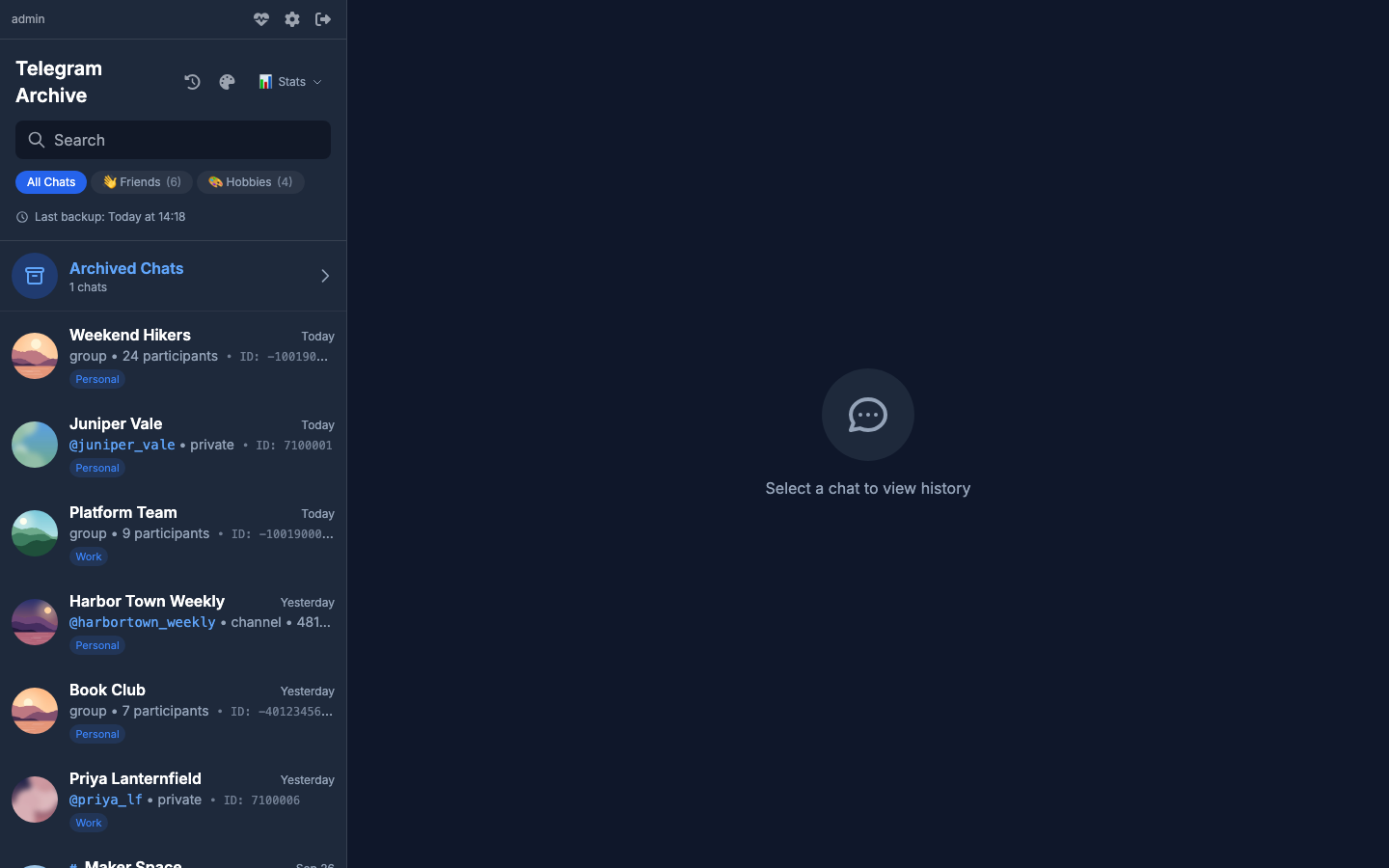
The viewer shows the stored folders as tabs above the chat list.
Priority, topics and media
PRIORITY_CHAT_IDS lists chats the backup processes first. Every other chat follows, most recently active first.
SKIP_TOPIC_IDS skips single topics of a forum group. Each entry is chat_id:topic_id, and entries are separated by commas:
Topic 1 is the General topic. The backup does not store messages in a skipped topic. It still moves its sync position past them. Removing the topic from the list later does not fetch those messages. A malformed entry stops startup, and the error names the entry.
SKIP_MEDIA_CHAT_IDS keeps a chat's messages but skips its media. See Media downloads.
Changing filters later
Filters are read when the process starts. After you change them, restart the backup container or process, and the next run applies them.
A chat that becomes included gets its whole history on the next run.
A chat that becomes excluded keeps what the archive already holds. To delete it, set:
On each run, the backup checks every chat in an exclude list. If the chat appears in that run's dialog lists, the backup deletes:
- its messages, message versions and reactions
- its media rows and their transcripts
- its sync position, forum topics and folder memberships
- the chat itself
- the
media/<chat_id>folder and the chat's avatars - push notification subscriptions scoped to that chat, when no other account still holds it
Files in media/_shared stay on disk. The backup does not delete chats that an include list or CHAT_TYPES leaves out. The option does nothing in whitelist mode.
Deletion cannot be undone
EXCLUDE_DELETE_EXISTING=true removes data on every run. Take a copy of the archive first, as described in Backing up the archive.
Group to supergroup migrations
Telegram can upgrade a basic group to a supergroup. The supergroup gets a new id. If that new id is outside your filters, the backup logs a warning with a count on every run.
To follow such chats, set:
The backup then adopts the new id, captures it in the same run and keeps it in scope from then on, in both modes. Exclude lists still win.
Deprecated names
| Old name | Current name |
|---|---|
| INCLUDE_CHAT_IDS | GLOBAL_INCLUDE_CHAT_IDS |
| EXCLUDE_CHAT_IDS | GLOBAL_EXCLUDE_CHAT_IDS |
| INCLUDE_FOLDER_IDS | GLOBAL_INCLUDE_FOLDER_IDS |
The old name is read only when the current one is unset or empty.
Per-account filters are covered in Multiple accounts.