Voice transcription
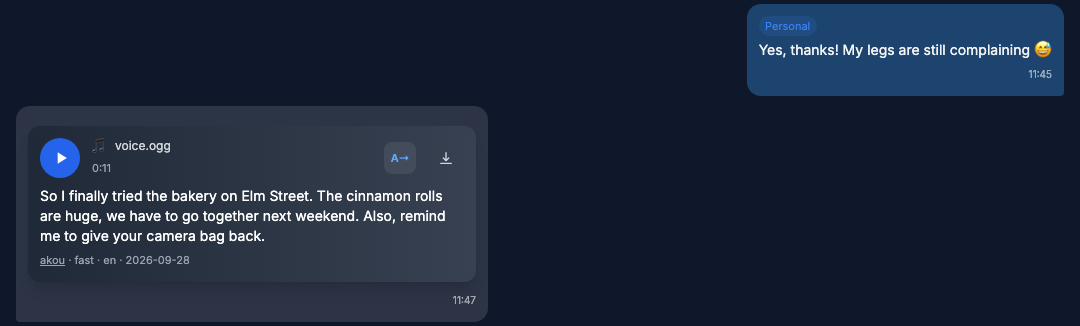
The archive can send voice messages and other audio to a transcription server and store the text it returns. The text is searchable and shows under each message in the viewer.
Overview and privacy
Transcription is on by default, but it does nothing until TRANSCRIPTION_URL is set. Until then the viewer shows a dismissible banner above voice messages: "Voice messages can be transcribed automatically. Point TRANSCRIPTION_URL at an akou server."
Only the backup container talks to the transcription server. The viewer never contacts it. The viewer only reports whether a URL is set.
Every upload carries the audio. The table lists what else each server gets. No chat titles, names, message text or ids are sent.
| Server | Also sent |
|---|---|
| akou | File name, content hash, preset, language, speaker-label option, callback URL if set |
| OpenAI endpoint | File name, model, language, hotwords |
| Deepgram | Model, language or a request to detect it, smart_format=true, and the speaker-label option with diarize_model=latest when it is on |
| AssemblyAI | Model if TRANSCRIPTION_MODEL is set, language or a request to detect it, speaker-label option |
| ElevenLabs | File name, model, language if you set one, speaker-label option, timestamps_granularity=word |
When the audio track is sent, the file name ends in .ogg.
Every result is stored as a new transcript row. The media row is never changed.
Availability
Added in 8.17.0
TRANSCRIPTION_PROVIDER, TRANSCRIPTION_MODEL, TRANSCRIPTION_HOTWORDS and the Deepgram, AssemblyAI and ElevenLabs adapters were added in 8.17.0. Older versions detect akou or an OpenAI-compatible endpoint by themselves from TRANSCRIPTION_URL.
Choosing a server
A drain is the step that sends queued files to the server. It runs after each backup run.
With TRANSCRIPTION_PROVIDER=auto, the default, each drain checks which kind of server TRANSCRIPTION_URL points at. An akou server with jobs gets the job API. Anything else gets the OpenAI endpoint.
Set the variables below on the backup container. The key goes in TRANSCRIPTION_API_KEY. The archive puts it in the header each server expects, and never logs it.
akou is the default. The archive talks to it through its job API and asks it for a preset instead of a model.
TRANSCRIPTION_URL=http://akou:8476
TRANSCRIPTION_API_KEY=your-akou-key
# lite, fast, best, fusion or auto
TRANSCRIPTION_PRESET=auto
The stock docker-compose.yml has a commented akou service block. It pins drumsergio/akou:0.2.1 and makes akou reachable as http://akou:8476. Before you uncomment it:
-
The image runs as uid 1000. Create its data and models folders and give them to that user:
-
Pull the models once before the first start:
-
In a container, akou must accept connections from other containers. It only does that when its settings say it runs behind a proxy. Set
server.behind_proxytotruein akou's settings.
akou can also run on another host. Point TRANSCRIPTION_URL at wherever it runs.
Any server with the OpenAI transcription endpoint works, hosted or self-hosted.
TRANSCRIPTION_URL=https://api.openai.com
TRANSCRIPTION_API_KEY=sk-your-key
TRANSCRIPTION_PROVIDER=openai
# Default: whisper-1
TRANSCRIPTION_MODEL=whisper-1
# Sent as the prompt, joined with ", "
TRANSCRIPTION_HOTWORDS=Kubernetes,Grafana
# Raise the 25 MB OpenAI cap for self-hosted servers
TRANSCRIPTION_MAX_UPLOAD_MB=500
The URL has no /v1 suffix. The archive appends /v1/audio/transcriptions itself.
TRANSCRIPTION_URL=https://api.deepgram.com
TRANSCRIPTION_API_KEY=your-deepgram-key
TRANSCRIPTION_PROVIDER=deepgram
# Default: nova-3
TRANSCRIPTION_MODEL=nova-3
The key is sent as Authorization: Token <key>.
# Or https://api.eu.assemblyai.com for the EU region
TRANSCRIPTION_URL=https://api.assemblyai.com
TRANSCRIPTION_API_KEY=your-assemblyai-key
TRANSCRIPTION_PROVIDER=assemblyai
# Empty lets AssemblyAI choose the model
TRANSCRIPTION_MODEL=
The key is sent as the raw Authorization header, without Bearer. The archive uploads the file, then polls every 3 seconds. If the whole call takes more than 600 seconds, the file fails with reason timeout. The archive keeps no AssemblyAI job id to resume, so a retry uploads the file again as a new job. AssemblyAI bills that job again if it completes.
Speaker labels and language
TRANSCRIPTION_DIARIZE=true asks for speaker labels. It works on akou's job API and on the Deepgram, AssemblyAI and ElevenLabs adapters. The OpenAI endpoint never labels speakers.
TRANSCRIPTION_LANGUAGE is a language hint, such as es. Leave it empty to let the server detect the language.
What gets transcribed and when
These media types can be transcribed:
- voice messages
- round videos
- audio files
- videos
- documents whose MIME type starts with
audio/orvideo/
GIFs are never transcribed.
Only downloaded files are transcribed. A chat or media type whose downloads are off is never transcribed. See Media downloads.
TRANSCRIPTION_TYPES limits what is picked up automatically. The default is voice. Valid names are voice, video_note, audio, video and document. The transcript button in the viewer works for any transcribable type, whatever this list says.
When files are sent
- The drain runs at the end of every backup run that finishes without an exception. A drain error is logged as a warning and never fails the backup.
- When the real-time listener downloads a file itself, it sends that file at once. This needs
LISTEN_NEW_MESSAGES_MEDIA=trueand the file's type inTRANSCRIPTION_TYPES. Otherwise the file waits for the next drain. - Pressing the button only queues the file. The next drain sends it.
Drain order and limits
Each drain sends files in this order:
- files whose button was pressed
- files from
TRANSCRIPTION_PRIORITY_CHAT_IDS, in list order - everything else, newest download first
One drain handles at most TRANSCRIPTION_BACKFILL_PER_RUN files per account. The default is 50, and pressed files count inside that number. With akou, jobs still open on the server count against it too. If open jobs fill the cap, even pressed files wait for a later drain.
Retries
- A file is retried automatically until it has 3 failed attempts. After that only a press retries it.
- A press always gets one more attempt, whatever happened before.
- A queued file that never got a job is sent again after 10 minutes.
- An unreachable server spends no retry. The file stays queued.
- Changing the language, preset, speaker labels or server means files are sent again instead of reusing earlier results. On the OpenAI endpoint the model and the hotwords count too. On Deepgram, AssemblyAI and ElevenLabs the model counts and the hotwords do not.
- The same audio already transcribed with the same settings, in this account or another, is copied instead of sent.
Limits and audio handling
TRANSCRIPTION_MAX_SECONDS skips any file longer than this many seconds. The default is 1800, which is 30 minutes. It has no "off" value: 0 skips every file with a known duration.
TRANSCRIPTION_MAX_UPLOAD_MB caps what is actually sent. The default is 500, or 25 when it is unset and TRANSCRIPTION_PROVIDER=openai. 0 means no limit. A bigger upload is skipped as too_large.
Before sending, the backup checks the file with ffprobe, except a voice message whose length is already stored. A file with no audio track is skipped as no_audio_track and never sent.
Voice messages and audio files are sent as stored. Everything else is sent as its audio track, extracted with ffmpeg to 16 kHz mono Opus. A voice or audio file over the upload limit is extracted too. At most 2 ffprobe or ffmpeg processes run at once.
If the server answers 413 Payload Too Large, the backup sends that file once more as its audio track. If the track is still refused, the file is skipped as too_large. Only that file is affected.
Both Docker images include ffmpeg and ffprobe. On a PyPI install without ffmpeg and ffprobe, the backup skips the audio check and sends the stored file instead of its audio track. Each missing tool logs one warning per process.
Callbacks with akou
By default the archive collects akou's results on the next drain. It reads akou's event feed and asks about any job still open after ten minutes. With a signed callback, akou delivers each result to the viewer as soon as it is ready.
Set the callback URL on the backup container. It is the viewer's public URL plus /api/transcriptions/callback:
Set the secret on the viewer container. It is the whsec_ secret from akou:
In the stock docker-compose.yml, TRANSCRIPTION_WEBHOOK_SECRET is commented out in the viewer's environment block. The viewer has no env_file, so uncomment that line or the secret never reaches it.
The viewer accepts callbacks only when transcription is enabled on it and TRANSCRIPTION_WEBHOOK_SECRET holds a valid whsec_ secret. The viewer checks the signature and answers 204 to every genuine delivery.
Allowlist the callback host
The callback host must be on the akou key's callback allowlist. Otherwise akou refuses every submit with callback_not_allowed and nothing is sent. Add the host on akou's side, or unset TRANSCRIPTION_CALLBACK_URL.
The callback URL must be reachable from akou. See Exposing the viewer safely.
In the viewer
The button
Each transcribable file gets a small rounded button with the →A glyph. It flips to A→ while the text is open.
| Media | Where the button sits |
|---|---|
| Voice and audio | Right of the waveform |
| Round videos | Over the bottom corner, right for incoming and left for outgoing. Opening the text turns the round video into a voice-style bubble. |
| Videos | Over the bottom corner of the player |
| Videos sent as a file | Beside the file name |
The button has five states:
| State | What you see |
|---|---|
| Loading | A stroke loops around the button while the file is queued or being transcribed. |
| Done | The button is ready. Pressing it opens the text. |
| Error | A grey reason shows under the media. |
| None | A server is configured, but this file has no transcript yet. Pressing queues it. |
| Unconfigured | No server is set. Pressing opens the banner instead. |
Error texts
| Reason | Text shown |
|---|---|
file_missing |
The audio file is missing |
expired |
The server dropped the job before it finished |
cancelled |
Cancelled on the transcription server |
not_found |
The transcription server no longer knows this job |
no_audio_track |
This file has no sound |
too_large |
Too large to send to the transcription server |
Longer than TRANSCRIPTION_MAX_SECONDS |
Longer than the N minute limit, with N from TRANSCRIPTION_MAX_SECONDS. In seconds when the limit is not a whole number of minutes |
| any other reason | The reason in sentence case |
| no reason, skipped | Not transcribed |
| no reason, failed | Transcription failed |
The text
An open transcript shows the full text, or "No speech detected" when the server returned no words. A caption under it names the engine, the model, the language and the date.
When a file has more than one finished transcript, a picker labelled "1 of N" switches between them, newest first.
With more than one speaker, the text reads as turns: "Speaker 1:", "Speaker 2:", numbered in order of first speech.
The viewer remembers per message whether a transcript is open. An "Expand all transcripts" button in the chat header opens every transcript in the chat. It then reads "Collapse all transcripts" and closes them. The viewer remembers that choice per chat.
Status, search and exports
The Archive Status panel, which only the master login sees, has a Transcription row. See Archive status.
| Value | Meaning |
|---|---|
| off | TRANSCRIPTION_ENABLED=false |
| on, no server configured | TRANSCRIPTION_URL is empty |
| on, server not detected yet | No drain has reached the server yet |
on, <name> <version> |
The server the last drain detected |
Chat search and global search find messages by their transcripts. The viewer marks these results as found in the transcript and opens the transcript at the match. On SQLite this needs FTS5. See SQLite and PostgreSQL.
Transcripts also appear in:
- the Voice tab of the media gallery, whose filter box matches file names and transcript text
- the What changed feed
- the viewer's chat export and the command line export
No-download logins see no transcript button, no transcript text and no transcript search hits. See No-download logins.
To turn transcription off on the viewer only, see Turning it off.
Turning it off
Set TRANSCRIPTION_ENABLED=false on both the backup and the viewer container. The archive stops sending files. The button, the banner and the callback endpoint disappear. Existing transcripts stay in search and exports.
With TRANSCRIPTION_ENABLED=false on the viewer only, bubbles hide transcripts. Search, the What changed feed and the exports still include the existing ones.
Deletion
Transcripts are removed only when their media is removed. Which settings delete media is covered in Media downloads and Environment variables.
The SQLite to PostgreSQL mover copies transcripts with everything else.
Settings
All settings except TRANSCRIPTION_ENABLED, TRANSCRIPTION_URL and TRANSCRIPTION_WEBHOOK_SECRET matter on the backup container only. "Stops startup" means a bad value aborts the process with an error. "Warns" means one warning is logged and the setting falls back as described. The number settings are checked only while transcription is enabled.
| Variable | Default | Read by | Bad value |
|---|---|---|---|
TRANSCRIPTION_ENABLED |
true |
backup, viewer | Stops startup |
TRANSCRIPTION_URL |
empty | backup; viewer checks only whether it is set | Warns and turns transcription off. Must be http or https with a host |
TRANSCRIPTION_API_KEY |
empty | backup | Not checked |
TRANSCRIPTION_PROVIDER |
auto |
backup | Warns and uses auto. Values: auto, akou, openai, deepgram, assemblyai, elevenlabs |
TRANSCRIPTION_MODEL |
empty, the provider's default | backup | Not checked |
TRANSCRIPTION_HOTWORDS |
empty | backup | Not checked. OpenAI endpoint only |
TRANSCRIPTION_PRESET |
auto |
backup | Warns and uses auto. Values: lite, fast, best, fusion, auto. akou only |
TRANSCRIPTION_TYPES |
voice |
backup | Warns and drops unknown names. If none remain, voice |
TRANSCRIPTION_MAX_SECONDS |
1800 |
backup | Stops startup |
TRANSCRIPTION_MAX_UPLOAD_MB |
500, or 25 when unset and TRANSCRIPTION_PROVIDER=openai |
backup | Stops startup. A negative value warns and means no limit |
TRANSCRIPTION_LANGUAGE |
empty, the server detects | backup | Not checked |
TRANSCRIPTION_DIARIZE |
false |
backup | Stops startup |
TRANSCRIPTION_CALLBACK_URL |
empty | backup | Warns and drops it. Results then arrive on the next drain |
TRANSCRIPTION_WEBHOOK_SECRET |
empty | viewer | Warns and ignores a value without the whsec_ prefix |
TRANSCRIPTION_BACKFILL_PER_RUN |
50 |
backup | Stops startup. Values below 1 become 1 |
TRANSCRIPTION_PRIORITY_CHAT_IDS |
empty | backup | Stops startup on a non-integer id |
The full list of variables is in Environment variables.
Troubleshooting
Transcription logs never contain the key, media ids, file names or transcript text. The startup line names the server's scheme and host only. The path, port and query of TRANSCRIPTION_URL are never logged.
| What you see | What it means |
|---|---|
Transcription drain: N done, N copied, N failed, N skipped, N submitted, N refused, N unreachable of N media; N filled from the event feed, N from the poll |
The INFO summary each drain logs. With no server set, the drain logs only at debug level. |
TRANSCRIPTION_PROVIDER=akou but the server did not answer as akou with jobs; nothing sent, the media stays queued |
The URL does not reach an akou server with the job API. Check the URL, or use auto or openai. |
| Files stay queued and every drain ends early on an OpenAI-compatible server | The server answers 404. Check that TRANSCRIPTION_URL has no /v1 suffix and that the model exists. |
A warning to check TRANSCRIPTION_MODEL and TRANSCRIPTION_LANGUAGE |
Two files were refused with a 4xx error and none succeeded. The model or language is usually wrong for this provider. |
callback_not_allowed |
The callback host is not on the akou key's callback allowlist. Add it on akou's side, or unset TRANSCRIPTION_CALLBACK_URL. |
| Archive Status says "on, server not detected yet" | No drain has reached the server yet. It fills after the next backup run. |
For general log and health checks, see Monitoring and troubleshooting.