Real-time listener
What it is
A scheduled backup only sees Telegram when it runs. The listener keeps each account connected between runs and writes changes into the archive as they happen.
ENABLE_LISTENER turns the listener on. It defaults to false.
The supported way to run the listener is the schedule command. The shipped compose file runs that command in the backup container. The scheduler starts one listener per configured account, on that account's shared Telegram connection. A one-shot telegram-archive backup never starts it.
A watchdog checks the listeners once a second and restarts a dead one after a 5-second pause. Healthy accounts are left alone.
Standalone entry point
python -m telegram_archive.listener starts a second Telegram client per account. Use schedule with ENABLE_LISTENER=true instead. See One client per session.
Settings
The LISTEN_* switches and REACTION_DEBOUNCE_SECONDS take effect only when ENABLE_LISTENER=true. Boolean values accept 1, true, yes or on to turn a setting on, and 0, false, no or off to turn it off. Any other value stops startup with an error that names the variable.
| Variable | Default | What it does |
|---|---|---|
LISTEN_NEW_MESSAGES |
true |
Save new messages as they arrive. |
LISTEN_NEW_MESSAGES_MEDIA |
false |
Download the media of new messages at once instead of at the next backup run. |
LISTEN_EDITS |
true |
Apply text edits and keep the previous text as a version. |
LISTEN_DELETIONS |
false |
Process deletions. When off, deletions are only counted. |
DELETION_MODE |
soft |
soft marks a message deleted and keeps it. hard removes it. Also governs the SYNC_DELETIONS_EDITS pass of the scheduled backup. |
LISTEN_CHAT_ACTIONS |
true |
Save service messages such as joins, leaves, title and photo changes. |
LISTEN_REACTIONS |
false |
Capture per-emoji reaction counts live. |
REACTION_DEBOUNCE_SECONDS |
1.5 |
How often buffered reaction updates are written. Values below 0.1 are raised to 0.1. |
For the rate-limit settings, see Mass-operation protection.
Which chats it follows
The listener keeps a set of tracked chats. It loads the set when it connects and reloads it after every scheduled backup. If a reload fails, the previous set stays in use.
A chat already in the archive stays tracked even if you later exclude it. The filters below decide only for chats the archive has not seen. To stop capturing an archived chat, remove its rows with EXCLUDE_DELETE_EXISTING.
For new messages, the listener accepts a first message from an unseen chat when the backup's chat filter would accept it. That filter covers the exclude lists, the include lists and CHAT_TYPES. See Choosing chats. A first message from a bot is judged as a private chat until the next backup run classifies it.
Edits, deletions, pins, reactions and chat actions carry no chat type. For a chat that is not tracked yet, the listener processes them only when the chat is in an explicit include list or include folder.
When CHAT_IDS is set, the listener processes only those chats, plus supergroups adopted through FOLLOW_CHAT_MIGRATIONS.
The listener skips forum topics listed in SKIP_TOPIC_IDS. That covers their new messages, edits, chat actions and reactions.
New messages
With LISTEN_NEW_MESSAGES=true, the listener saves each new message as it arrives. It stores the text, the sender, the chat, the album id, the link preview, the forward origin and the formatting.
Media waits for the next scheduled backup by default. With LISTEN_NEW_MESSAGES_MEDIA=true the listener downloads it at once. It applies the same rules as the backup: the DOWNLOAD_MEDIA switch, the size cap, media types, document MIME types, YouTube previews, SKIP_MEDIA_CHAT_IDS and deduplication. See Media downloads.
Edits
The listener applies an edit only when the text changed and the edit is not older than the stored version. An edit that carries no date is applied only when the message was never edited before. Edits to messages that are not in the archive are skipped.
When an edit is applied, the previous text is saved as a version. The viewer marks the message edited(N), where N is the number of saved versions, and lets you open the earlier texts.
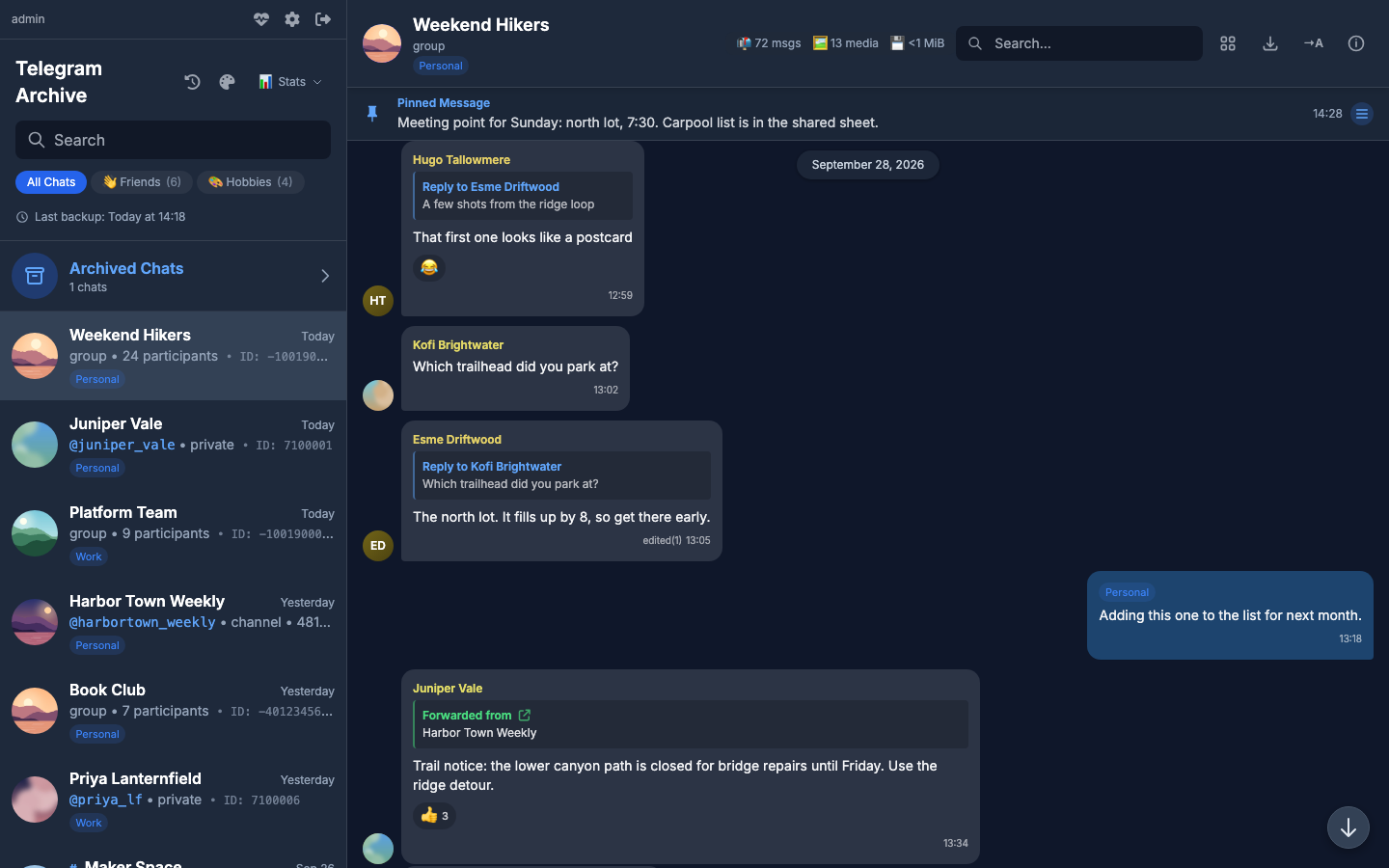
An edit that changes only the formatting refreshes the stored formatting quietly. It saves no version, sends no update to the viewer and fires no webhook.
Deletions
Deletions are ignored unless LISTEN_DELETIONS=true. DELETION_MODE then decides what happens:
| Mode | Effect |
|---|---|
soft (default) |
The listener marks the message deleted, keeps it, and records the first deletion time. The viewer fades it with a deleted label and lists it in What changed. |
hard |
The message row is removed, together with its saved versions, its media rows, their transcripts and its reactions. |
Keep evidence with soft mode
If the archive exists to keep a record of what was said, use soft. A hard deletion cannot be undone.
For private chats and basic groups, Telegram reports a deletion without a chat id. The listener then searches that account's archive for the message id. It skips channels and supergroups in this search. It applies the deletion only when exactly one chat holds that id. When no chat or several chats match, the deletion is skipped.
Only soft or hard
DELETION_MODE accepts only soft or hard. Any other value stops both the backup and the viewer at startup.
Chat actions and pins
With LISTEN_CHAT_ACTIONS=true, a service message is written with its real Telegram id and date. A title or photo change also refreshes the chat row, and a new photo downloads the new avatar. Events that come without a service message are skipped.
Pins and unpins are always captured while the listener runs. No setting turns them off. They are not rate-limited and not filtered by topic.
Reactions
With LISTEN_REACTIONS=true, the listener stores per-emoji counts. It never stores who reacted. Updates are buffered per message and written every REACTION_DEBOUNCE_SECONDS, so a burst of changes becomes one write. When an emoji disappears, the listener marks it removed and keeps the row. Reactions on messages that are not in the archive are skipped.
The listener can miss some reaction changes. Telegram does not reliably push reactions that you add from another device. The listener narrows the gap by also reading the reactions carried on edits and on new messages. It skips partial reaction objects, because those can leave out your own reaction. To correct counts on older messages, set REACTION_RESWEEP_DAYS so each scheduled backup re-checks recent days. See Schedule and backup tuning.
Mass-operation protection
A burst of edits or deletions, such as someone clearing a whole chat, could overwrite or remove large parts of the archive. The listener guards against this with a rate limiter.
| Variable | Default | What it does |
|---|---|---|
MASS_OPERATION_THRESHOLD |
10 |
Most edits plus deletions the listener applies per chat within one window. |
MASS_OPERATION_WINDOW_SECONDS |
30 |
Length of the sliding window. It is also how long a chat stays blocked once it goes over the limit. |
Each chat has one sliding window, shared by edits and deletions. With the defaults, the first 10 operations inside 30 seconds are applied. The 11th goes over the limit. The listener then blocks that chat's edits and deletions for one more window.
The listener drops blocked operations. It does not queue them, update the viewer or fire a webhook. It keeps every operation it applied before the chat went over the limit. The counters live in memory and reset when the process restarts.
The limiter covers the listener only. The SYNC_DELETIONS_EDITS pass of the scheduled backup has no such limit.
Checked at startup, even with the listener off
Both values must be at least 1. The backup and the viewer refuse to start otherwise.
Retired setting
MASS_OPERATION_BUFFER_DELAY no longer does anything. Remove it. While it stays set, it must be a number or startup stops.
Checking that it runs
In the viewer, the chat list header shows Real-time sync next to the last backup time while a listener is active. For the master login, the Archive Status panel shows one Listener row per account. See Archive status.
When a listener stops, it logs counters for edits, deletions, new messages and the rate limiter.
How changes reach the viewer
New messages, edits, deletions, pins and reaction changes the listener applies are passed to the viewer. Service messages saved from chat actions appear after a reload. On PostgreSQL this goes through the database. On SQLite the backup container calls the viewer over HTTP.
The viewer then updates open browsers over a WebSocket, so an open chat shows new messages, edits, deletions, pins and reactions without a reload. Browser and Web Push notifications also depend on the new messages the listener captures. For setup, ports and notification modes, see Live updates and notifications.
Related pages
- A voice message the listener downloads can be transcribed right away. See Voice transcription.
- To send an HTTP request to another system each time the listener applies an edit or a deletion, see Event webhook.